- What is?
- It is an open-source, distributed, event-streaming platform
- Designed to:
- handle large quantities of data
- be Scalable to various situations
- What is an event?
- Obtaining information from various sources
- Reliably storing that data
- Providing it to any users or systems needing access
- Kafka Components:
- Topics:
- Common message type stored within KafkaNotepad where Kafka stores the events or messages it receivesThere can be any number of topics within a Kafka system
- Producer
- Writes events to various topics
- A producer can write to a single or multiple topics
- Consumer
- Reads the information from topics
- Topics:
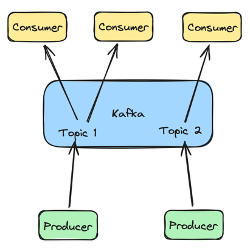
Kafka Producers:
- What is a producer?
- Also called the publisher
- It is the component that writes messages to Kafka topics
- Messages sent via producers are stored on Kafka for later use
- The goal is to retain the data written to Kafka for as long as possible
- Many producers can communicate with Kafka at the same time
- Each producer can write to a single or multiple topics required
- Types:
- Command-line producer:
- Included in the Kafka software installation
- kafka-console-producer.sh
- Found in the /bin folder
- –bootstrap-server – Specifies which server to use
- –bootstrap-server localhost:9092
- –topic – Specifies the topic to write to
- –topic phishing-sites
- This is an open connection where you can type a message
- –bootstrap-server – Specifies which server to use
- Found in the /bin folder
- kafka-console-producer.sh
- Included in the Kafka software installation
- Example:
- Command-line producer:
Interactive:
bin/kafka-console-producer.sh –bootstrap-server localhot:9092 –topic testing >This is the first message >This is the second message >This is the third message <ctrl+c to exit>
Non-interactive
echo “This is the first message” | bin/kafka-console-producer.sh –bootstrap-server localhost:9092 –topic testing
- Python
- Java
- Many other languages
- Kafka Connect
- Designed to interact with existing systems:
- Relational databases
- Automatically transfer data between them
- Designed to interact with existing systems:
Kafka Consumers
- A consumer is the reader portion of the Kafka platform
- It is also called the subscriber
- Consumers can read messages stored within Kafka
- There can be many consumers communicating with Kafka system at a time
- A consumer can read from a single or multiple topics at a time
- Types:
- Command-line
- Kafka-console-consumer.sh
- Found in the /bin folder
- -bootstrap-server – Specifies which server to use
- –bootstrap-server localhost:9092
- –topic – Specifies to topic to write
- ––topic phishing-sites
- This open a connection where you can read a message
- –from-beginning
- Tells the Kafka system to send all messages in topic, even ones that may have been already read
- –max-messages
- Used to read up to a maximum number of messages before exiting
- Kafka-console-consumer.sh
- Command-line
Interactive
bin/kafka-console-consumer.sh –bootstrap-server localhot:9092 –topic testing –from-beginning –max-messages 2>This is the first message>This is the second message<automatically exit>
-
- Python
- Java
- Many other languages
- Kafka Connect
Kafka Architecture
Components
| Kafka Servers | Kafka Clients |
| A cluster of one or more computersStore dataManage communication with Kafka clients Handle integration with other systems DatabasesLog Files | Read data via Kafka consumersWrite data via Kafka producersProcess data locally and then store that information elsewhere or back to Kafka itself |
Kafka Server
- Primary task: Act like a Kafka broker
- Handle communication between consumers and producers
- Handles data storage
- Data written by producers is stored and organized via topics
- Topics are partitioned – they are stored in separated pieces
- The individual messages are stored in a given partition based on an event id – e.g. customer_id, location_id
- Each message will be retrieved in the order it is written to the topic
- Topics are partitioned – they are stored in separated pieces
- Data written by producers is stored and organized via topics
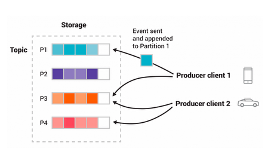
Partition & Replication – Kafka Servers
- Kafka is fault-tolerant
- If one system goes offline, others can provide the requested data
- For each kafka cluster, there is a replication factor
- Replication factor = Max number of failures – 1
- Max replication factor == number of servers
- Copying partitions is how replication is handled
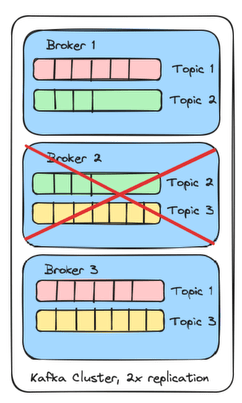
- Kafka broker with 3 clusters
- 3 topics
- 2x replication
- There is a copy for each topic
- Each topic is shared across 2 brokers within the cluster
- If Broker 2 fails
- Replication factor 2x
- 2 -1 == can handle 1 failed system
- Each topic still has at least one copy on the cluster
Kafka Clusters
- Zookepeer
- A software framework for
- managing information
- providing services necessary for running distributed systems
- Used to created distributed applications
- Users use zookeepers to manage those distributed applications
- What does it do?
- Handling any configuration information
- Naming of systems to prevent conflicts
- Provides the ability to synchronize across systems
- Which systems are available
- When they should start
- How services can reach them
- Provide services for a group of systems to communicate
- Since it is a framework, it is not required to implement a custom version of these services
- This allows for easier configuration, implementation, and interaction
- A software framework for
- Kafka uses Zookeeper for cluster management
- New versions of Kafka can use Kraft
- Two files used for server/cluster setup:
- Config/zookeeper.properties
- Handles information needed for a basic zookeeper setup including where to store zookeeper data and what network port to run on
- Config/server.properties
- This is the primary Kafka server configuration
- Define information specific to Kafka installations
- Details about:
- Kafka brokers
- Network configuration
- Where to store events
- Basic topic configuration
- Replication details
- Details about:
- Config/zookeeper.properties
- How to start a Kafka cluster?
- Kafka servers are started in two steps:
- Start up the basic zookeeper server and configuration details
- Bin/zookeeper-server-start.sh config/zookeeper.properties
- Start up the actual Kafka services as defined in the server.properties file
- Bin/kafka-server-start.sh config/server.properties
- Start up the basic zookeeper server and configuration details
- Kafka servers are started in two steps:
- How to stop a kafka cluster?
- We use the reverse order of shutdown because kafka should first cleanly shutdown any open connections and because it uses zookeeper services.
- Bin/kafka-server-stop.sh
- Bin/zookeeper-server-stop.sh
- We use the reverse order of shutdown because kafka should first cleanly shutdown any open connections and because it uses zookeeper services.
Kafka Topics
- What is a topic?
- Logical grouping of events where each event or message is referring to the same type of thing
- E.g. orders, downloads, virus detections, etc.
- A topic is similar to a table in a relational database, where each event has a similar structure and a meaning
- Also referred as an event log
- Messages written to the log are immutable
- Messages can be read or created, but they cannot be modified
- A message will be only removed based on age, but otherwise, it is available to be read at any point in the future, given enough storage space
- Logical grouping of events where each event or message is referring to the same type of thing
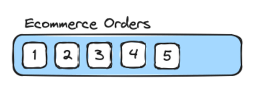
- Create topics
- There are multiple ways to create topics
- We can use bin/kafka-topics.sh script to create topics
bin/kafka-topics.sh --bootstrap-server localhot:9092 --topic <topic_name> --create --replication-factor <x> # Specifies how many copies of a topic exist within a kafka cluster --partitions <x> # Specifies the number of partitions to split the topic into. This is a performance optimization but allows Kafka to handle higher throughput
- Describe topics
- –describe to get details about the configuration of a Kafka topic
bin/kafka-topics.sh –bootstrap-server <server> --topic <topic_name> --describe
- Removing topics
- –delete
- to remove the topic from a Kafka serve/cluster
- It also removes all messages in the topic
- –delete
Bin/kafka-topics.sh –bootstrap-server <server> --topic <topic_name> --delete
 Daniela Fernandez