Data Engineering lifecycle is the process that data must go through to be useful:
- Generation
- Ingestion
- Processing
- Storage
- Consumption
A data pipeline is an automated implementation of the entire data engineering lifecycle. Each pipeline component performs one stage of the cycle and creates an output that is automatically passed to the next component.
Data Pipeline Design – Basic principles
- Loose coupling
- Each component of the data pipeline should be independent, communicating through well-defined interfaces
- This “independence” allows components to be modified without affecting the rest of the pipeline
- Scalability
- Provide the pipeline the ability to automatically grow depending on the volume of the data flow
- This is more efficient than over-provisioning resources
- Security
- Data pipelines are targets for hackers, always have security in mind while designing them
- Flexibility
- Data pipelines may change over time based on the business needs. Your pipeline should be able to incorporate changes with minimal impact
Data pipeline Architectural Patterns
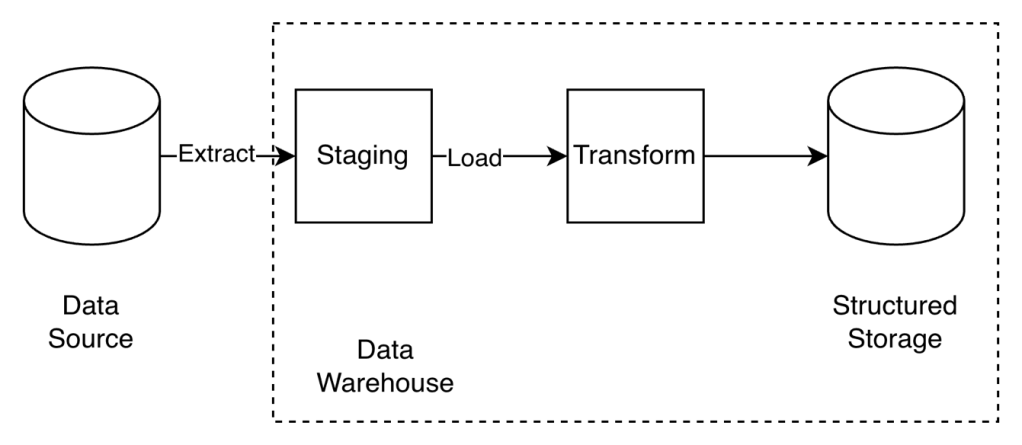
Data Warehouse
- A central data hub where data is stored and accessed by downstream analytics systems.
- It is characterized by strict structure and formatting of data so that it can be easily accessed and presented.
Data Lake
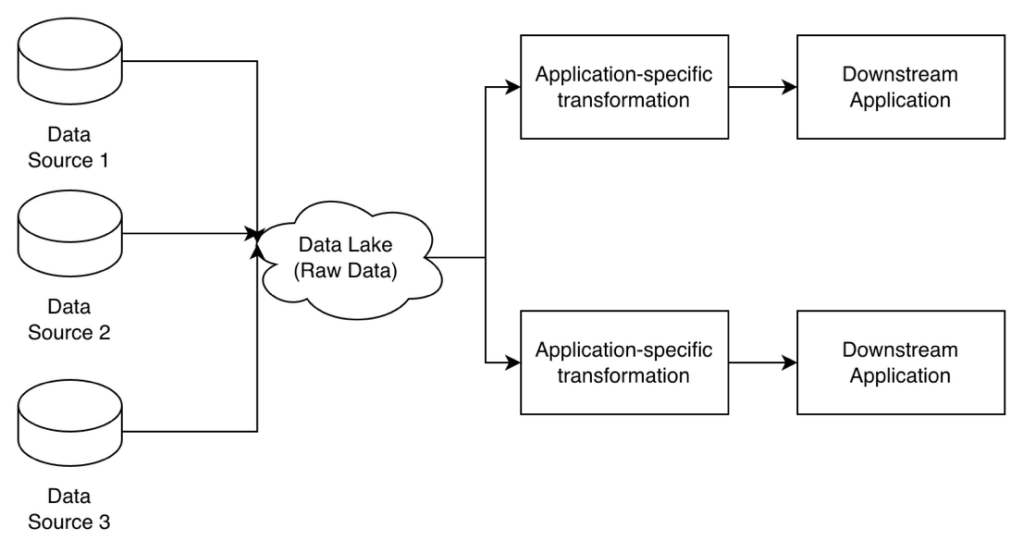
- A more flexible data pipeline architecture that relies on cloud-based infrastructure to be cost-effective while enabling a huge variety of data processing use cases.
- It does not enforce structure on data stored within it, accepting data from a large variety of sources and storing it as is.
- All the transformations and processing are done on-demand based on the downstream application’s needs through data processing clusters running frameworks like MapReduce or Spark.
- Data lake pipelines are useful for applications that process data in multiple ways, and it is not efficient to add structure to the data up-front.
- Data lakes are used by highly data-intensive companies that use processed data for many machine learning and analytics use cases.
DataFlow pipeline
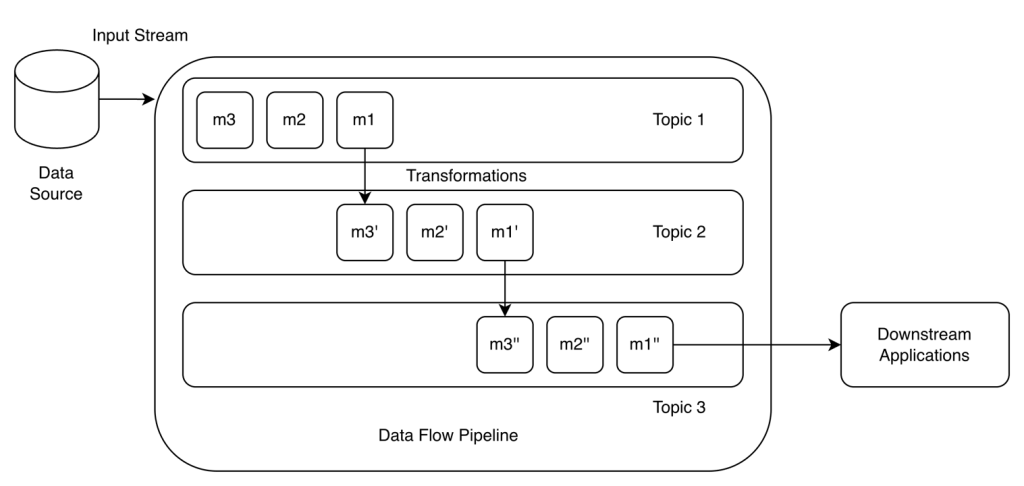
- Dataflow pipelines are data pipelines for data streaming applications.
- They typically use a data streaming platform like Kafka or Redpanda as the data transfer layer, with data being ingested as small messages.
- Transformations are also done using data streams- each incoming message is passed through a series of data streams (or Kafka topics) while being transformed each time.
- Downstream applications directly listen to output streams for individual transformed messages or access batches in the form of aggregations.
- Apache Flink to create dataflow pipelines, and create transformation functions to create derived streams from our original stream
IoT data pipeline
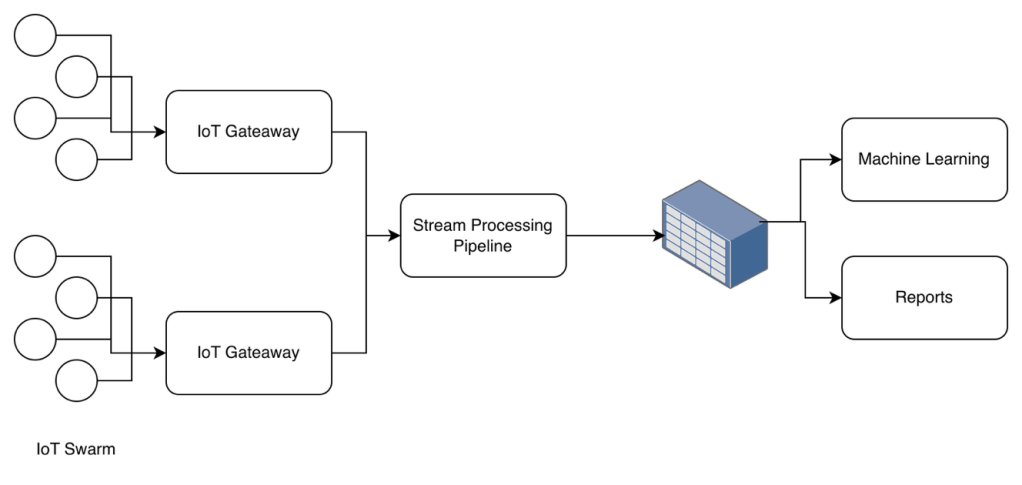
- Data pipeline for IoT devices
- An IoT gateway is a common connection point that IoT devices can connect to and send data without doing much processing on it.
- It has sophisticated business logic for filtering and routing the data correctly
- A single gateway collects data from multiple devices.
- Use on:
- Home monitoring systems,
- Vehicle connectivity systems,
- Scientific data collection from remote sensors
Data Pipeline Design Patterns
- Batch Processing
- Collect all data, and process it in scheduled chunks
- Super cost-efficient
- Less complicated to manage

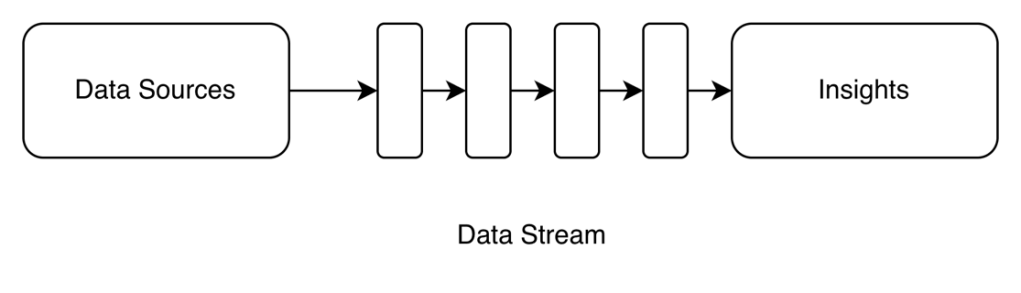
- Stream Processing
- It handles data in real-time, as it flows in
- Use it when you need to catch things immediately
- Use it when you need instant insights
- Costly
- Lambda Architecture
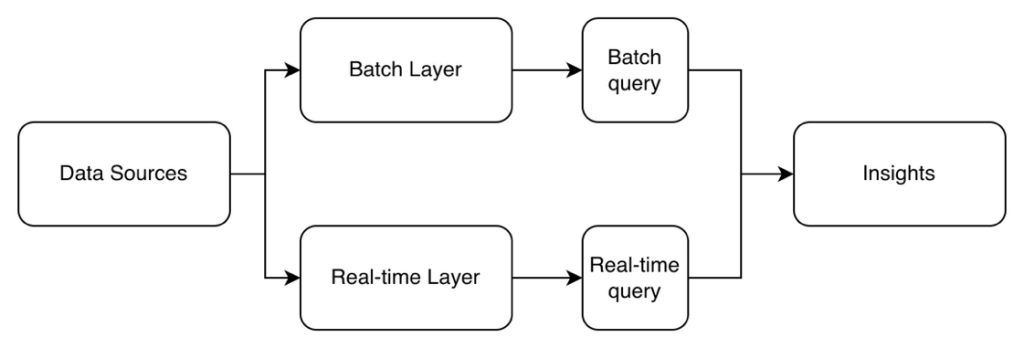
- Both, batch and stream processing running in parallel
- Use it when you need real-time data and analyticsCostly since you are maintaining two systems
- Your data needs to be agile enough to work with different technologies while keeping their data definitions consistent.
- Kappa Pattern
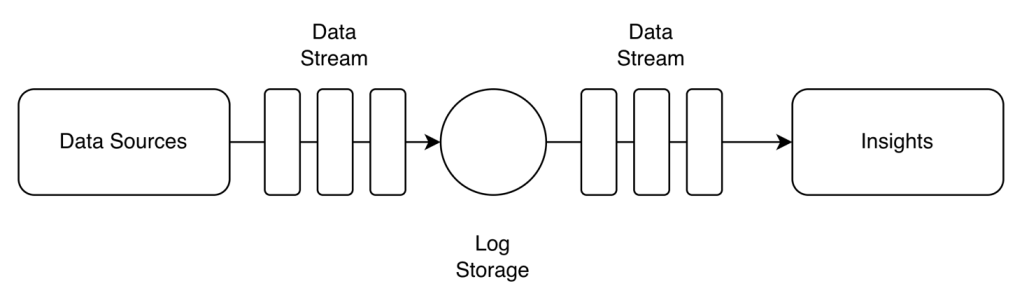
- Instead of having both batching and streaming layers, everything is real-time with the whole stream of data stored in a central log like Kafka.
- By default, you handle everything like you would under the Stream Processing Pattern, but when you need batch processing on historic data, you just replay the relevant logs.
- Perfect for IoT sensors or real-time analytics.
- Simple since one system rules everything
- ETL (Extract, Transform, Load) Pattern
- Use it when you know exactly what to do with your data and you want to be consistent every time
- Perfect for financial reporting or regulatory compliance

- ELT (Extract, Load, Transform) Pattern
- Use it when:
- Unsure of what to do with the data, but you know you will need it in the future
- Different teams need different transformations
- Works well with the low cost of modern data storage
- Use it when:

- Data Mesh Pattern
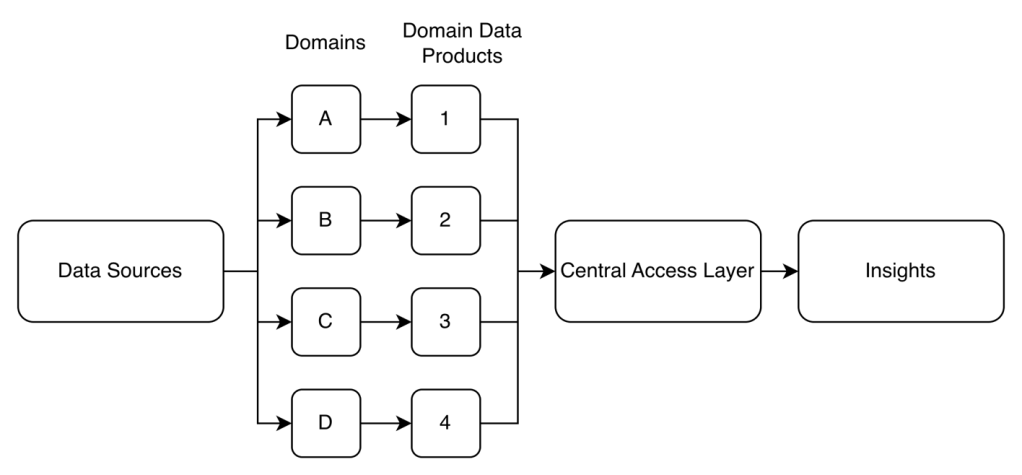
- Each department manages their own data pipeline
- Good for bigger companies
- Data Lakehouse Pattern
- Combining the best parts of data warehouses with data lakes
- Get the structure and performance of a warehouse with the flexibility and scalability of a lake
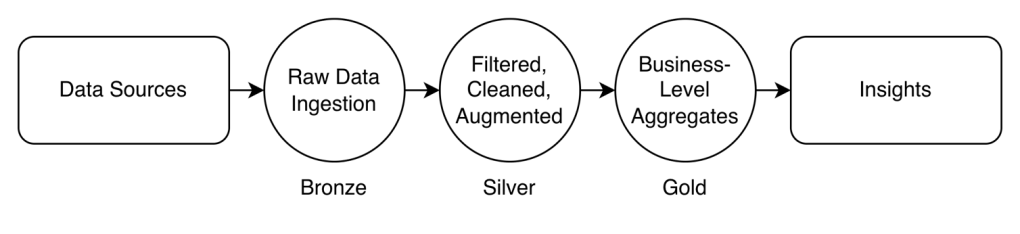
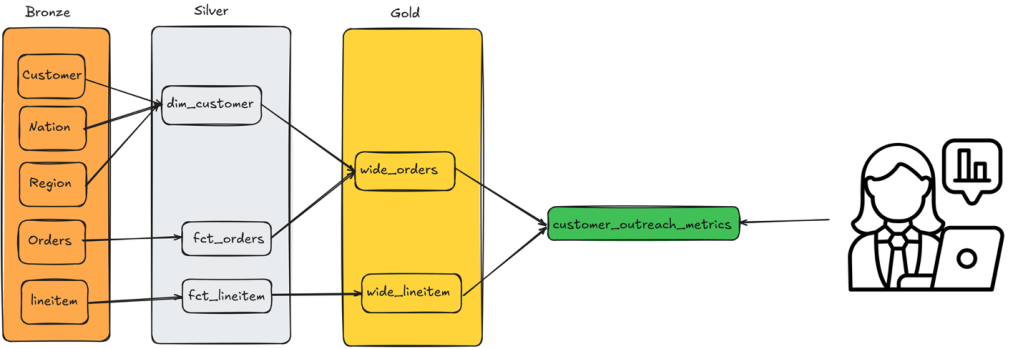
- Data typically flows through three stages:
- Bronze: Raw data lands here first, preserved in its original form.
- Silver: Data gets cleaned, validated, and conformed to schemas. This middle layer catches duplicates, handles missing values, and ensures data quality.
- Gold: The final, refined stage where data is transformed into analytics-ready formats. Here you’ll find aggregated tables, derived metrics, and business-level views optimized for specific use cases.
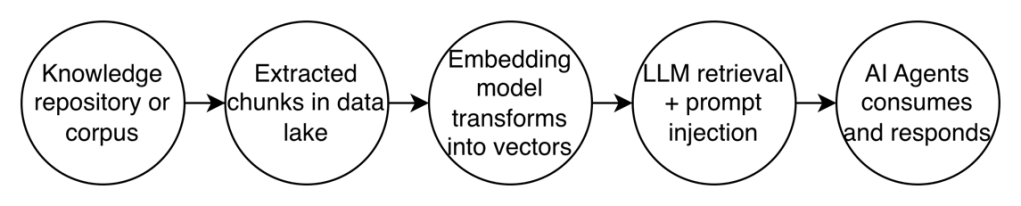
- Retrieval Augmented Generation Pattern (unstructured data context for AI)
- Provide the context to AI agents needed to complete a task successfully
- An agent may need both structured and unstructured data
- Transform the data into vectors
Data Engineering Tools
Ingestion Tools
- Collect and import data from diverse sources into a data ecosystem.
- These tools offer features like:
- Data deduplication
- Schema Detection
- Error handling
- Types:
- Managed SaaS Ingestion Tools – Minimal setup
- Airbyte
- Fivetran
- Stitch
- Hevo Data
- Rivery
- Open-Source Ingestion tool – More control
- Meltano
- Apache Nifi
- Logtash
- Debezium
- Streaming Ingestion Tools – Used for real-time data pipelines
- Apache Kafka
- Apache Pulsar
- Amazon Kinesis
- Managed SaaS Ingestion Tools – Minimal setup
- Google Pub/Sub
 Daniela Fernandez