Single Server Setup
In this setup, everything runs on a single server: the web application, database, cache, and other components are all hosted together.
Here’s how the request flow works:
- A user accesses the website through a domain name, such as mysite.com.
- The Domain Name System (DNS) resolves the domain name and returns the corresponding Internet Protocol (IP) address to the user’s browser or mobile app.
- With the IP address in hand, the client sends HyperText Transfer Protocol (HTTP) requests directly to the web server.
- The web server processes the request and responds with either HTML pages or JSON response for rendering on the client side.
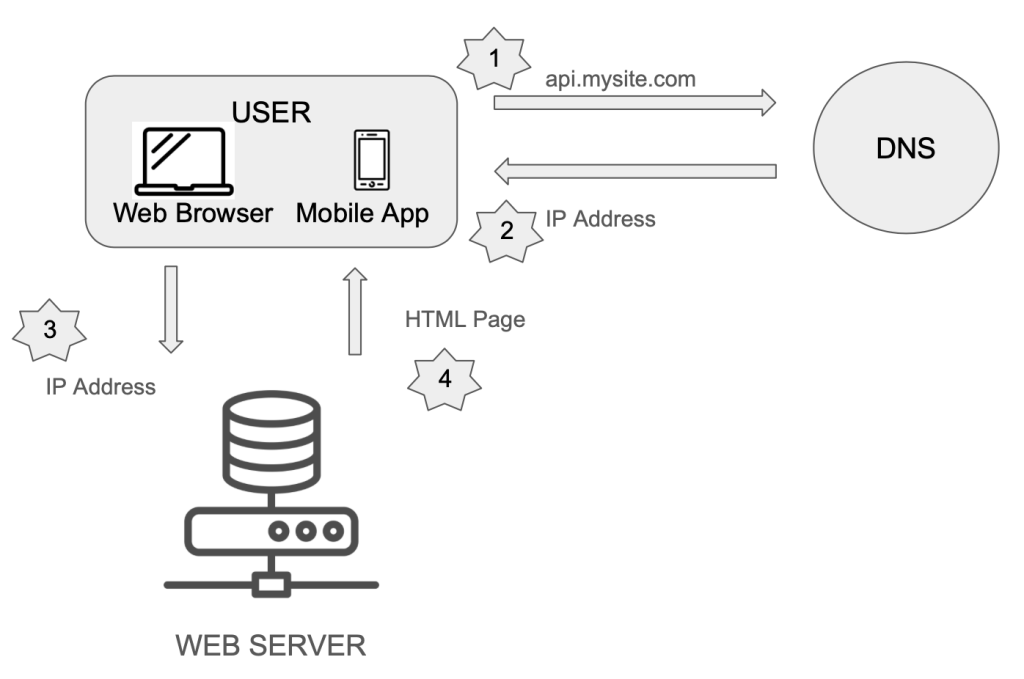
The traffic source comes from two sources:
- Web Application
- Mobile Application
Database
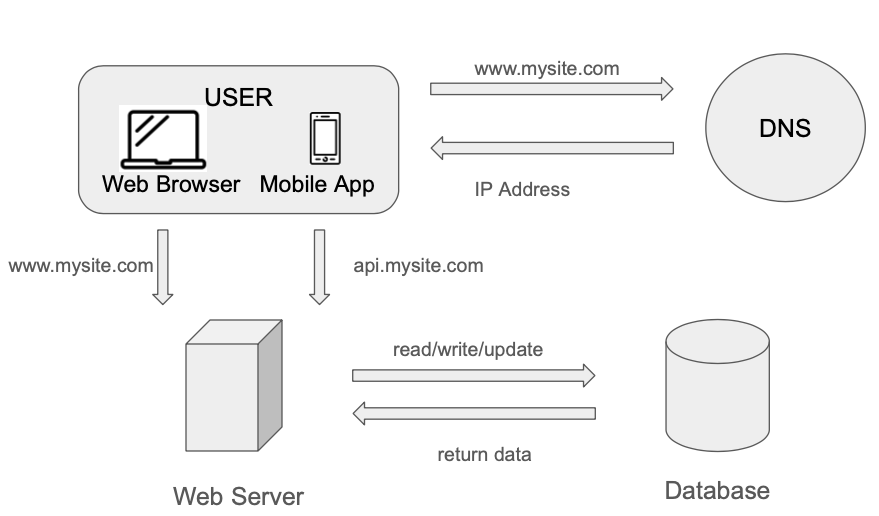
If the user base grows, one server will not be enough, we will need multiple servers:
- Web/mobile traffic Server (web tier)
- Database server (data tier)
Having them as independent servers allows them to be scaled independently.
Which database to use?
We have two options:
| Type | Relational Databases | Non-relational Databases |
| Also called | Relational Database Management System (RDBMS) or SQL Database | No-SQL Databases |
| Examples | MySQL, Oracle Database, PostgreSQL | CouchDB, Neo4J, Cassandra, HBase, Amazon DynamoDB |
| How is data store? | Data is stored in tables and rows | – key-value stores – graph stores – column stores – document stores |
| Are join operations supported? | Yes | No |
Most developers decide to use relational databases since they have been around for the past 40 years and work well. However, if they don’t meet the application needs, No-SQL should be explored. Non-relational databases might be the right choice if:
- The application requires low latency
- Data is unstructured, and there is no relational data
- System only needs to serialize and deserialize data (JSON, XML, YAML, etc.)
- Need to store a massive amount of data
Vertical Scaling vs Horizontal Scaling
Vertical Scaling – Scale up
Adding more power (CPU, RAM, etc.) to the servers
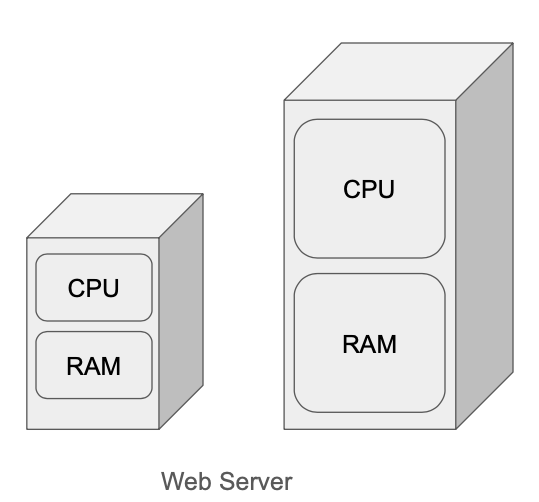
When traffic is low, vertical scaling is a great option since it is easy to do. Unfortunately, it comes with limitations:
- It has a hard limit. It is impossible to add unlimited CPU and memory to a single server
- Vertical scaling does not have failover and redundancy. If the server goes down, the website/app goes down with it completely
Horizontal Scaling – Scale out
Adding more servers into the pool of resources
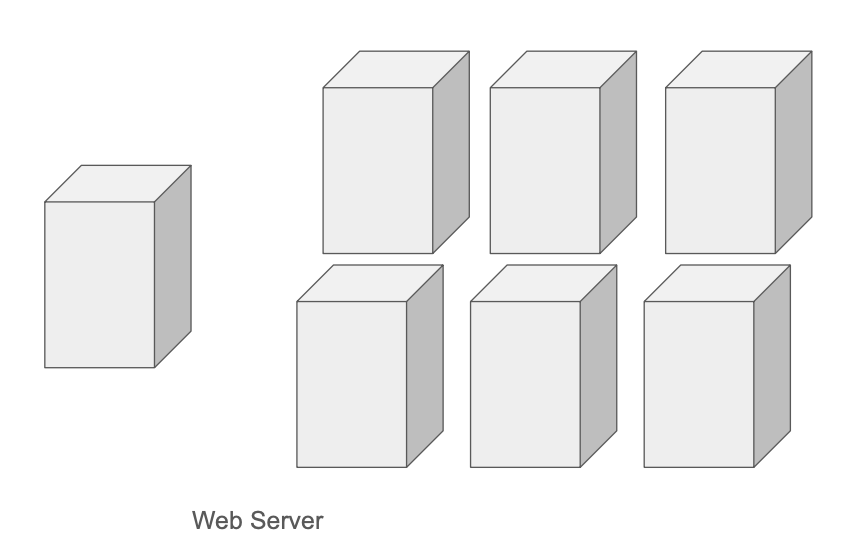
Horizontal scaling is more desirable for large scale applications due to the limitations of vertical scaling.
Load Balancer
Consider the following scenarios:
- If users are connected directly to a single web server and that server goes offline, the website becomes inaccessible to all users.
- If too many users attempt to access the server at the same time and it exceeds its capacity, users may experience slow response times or service interruptions.
A reliable solution to these issues is to use a load balancer. It distributes incoming traffic across multiple servers, ensuring better performance, high availability, and fault tolerance.
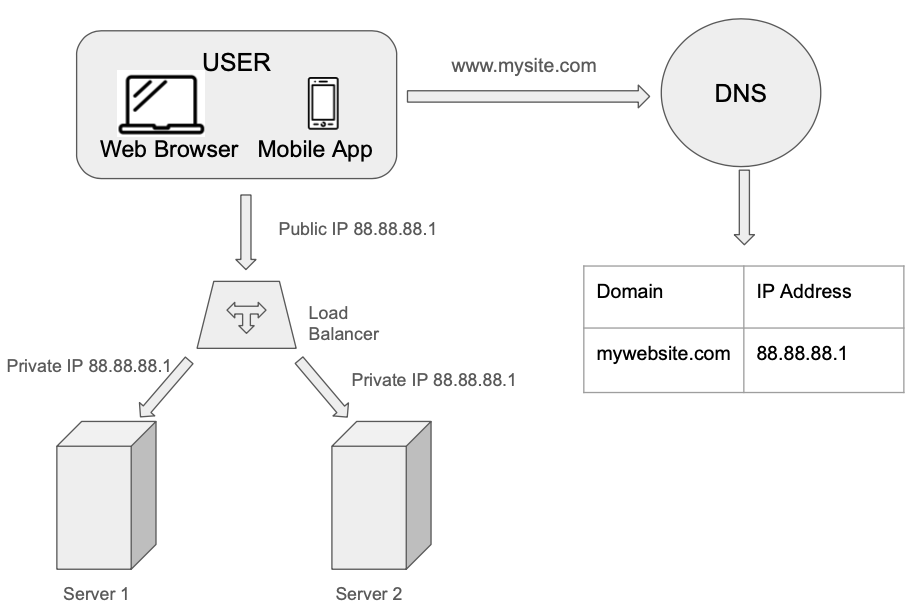
Users connect directly to the Public IP of the Load Balancer directly. With this setup, servers are unreachable directly by clients anymore. For better security, private IPs are used to communicate between servers. The load balancer communicates with web servers through private IPs.
Thanks to the addition of the second server, we have solved no failover issue and improved the availability of the web tier.
- If server 1 goes offline, all the traffic will be routed to server 2. This prevents the website from going offline
- If the web traffic grows rapidly, and two servers are not enough to handle the traffic, the load balancer can handle this problem gracefully. You only need to add more servers to the web server pool, and the load balancer automatically starts to send requests to them
Database Replication
Database replication is the process of copying data from a primary (or main) database to one or more replica databases. This ensures that the same data is available in multiple locations.
In this setup:
- The primary database handles all write operations, including insert, update, and delete.
- Replica databases are read-only; they support read operations only and are kept in sync with the primary.
Benefits of Database Replication
1. Improved Performance
Read operations can be distributed across replicas, allowing parallel access by multiple users. This reduces the load on the primary database and improves overall system responsiveness.
2. Enhanced Reliability
If the primary database fails, a replica can be promoted to take its place. Similarly, if a replica is lost, other replicas continue to serve read requests. Since data is distributed across multiple nodes, the risk of data loss is minimized.
3. High Availability
By deploying replicas in different geographic regions, users can access data from the closest location. This ensures continued access even if one region goes offline, improving fault tolerance and reducing latency.
Challenges and Considerations
Promoting a replica to a primary database in production environments can be complex. One common issue is replica lag, where the replica may not be fully synchronized with the primary. To address this, advanced replication strategies such as multi-master replication and circular replication can be used to improve data consistency and fault tolerance.
The diagram below illustrates how the data layer fits into our system architecture:

 Daniela Fernandez