I’ve lived in Oakland for the past five years, and over that time, I’ve come to appreciate three places that, to me, define the city:
- The Port of Oakland
- Lake Merritt
- Reinhardt Redwood Regional Park
Admittedly, I may be biased, these are the places I frequent for my regular runs, but I also believe they represent the heart and soul of Oakland. In this post, I want to focus on the Port of Oakland and explore how it serves as a perfect analogy for a modern data application built using Docker, Kubernetes, and Argo Workflows.
The Port of Oakland: A Brief Overview
The Port of Oakland was established in 1927. It employs nearly 500 people directly and supports close to 100,000 jobs throughout Northern California. It generates $174 billion in annual economic activity and spans 1,300 acres, with approximately 780 acres dedicated to marine terminals.
It’s one of the four largest ports on the Pacific Coast, alongside Los Angeles, Long Beach, and the Northwest Seaport Alliance (Seattle and Tacoma). It’s a critical hub for the flow of containerized goods, handling over 99% of the container traffic in Northern California.1
Why Compare a Port to a Data Application?
At first glance, ports and data systems might seem unrelated. But if you’ve ever worked with containerized data applications, especially those using Docker, Kubernetes, and Argo, the parallels are striking. Let’s look at the core components of our stack before diving into the analogy.
Kubernetes: The Port Authority
Kubernetes, also known as K8s 2
Formal definition: Kubernetes is an open-source system for automating deployment, scaling, and management of containerized applications
Let’s dive in this definition.
Modern architecture is constructed from independent building blocks called micro services. These micro services can be independently maintained and updated, and they are ideally suited for cloud computing.
To deploy, maintain, and updated these micro services we do it via containers. Containers are a standard unit of software that packages up code and all its dependencies so the applications runs quickly and reliably from one computer environment to another.
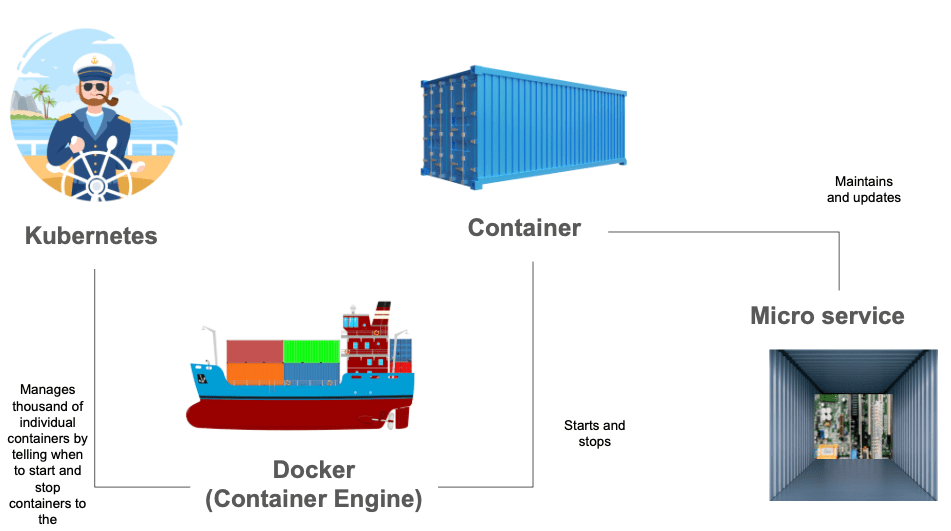
To keep track of all these containers, we use Kubernetes.
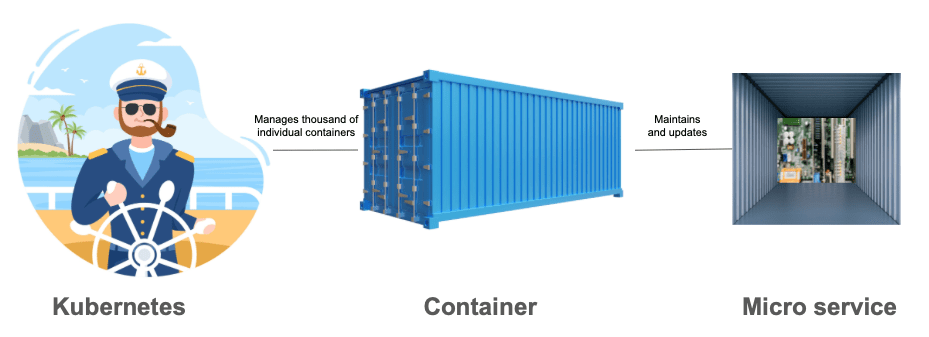
There are many tools for container orchestration, but Kubernetes has 95% of the market.
Users love Kubernetes because it solves the typical challenges of container orchestration:
- Scheduling and Networking
- Attaching storage to a container
To solve these issues, Kubernetes interacts with a Container Engine. Kubernetes tells the Container Engine to start or stop containers in the correct order and in the right place.
Docker: The Shipping Container
Docker is the Container Engine. 3
Formal definition: Docker is a platform designed to help developers build, share, and run containerized applications.
To create containers, we use a Docker image. A Docker image is a light weight stand alone, executable package of software that includes everything needed to run an application: code, runtime, system tools, system libraries, and settings.
A Docker image becomes a container at runtime
To create a Docker image, you need to define a Docker file
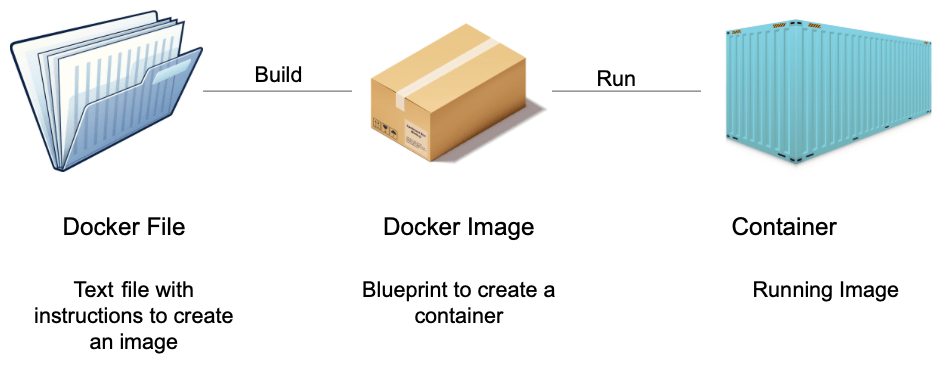
Docker images let the Docker engine construct containers with all the necessary software components from an image.
Argo workflows: The shipping manifest
Argo lets us define workflows where each step runs as a containerized task in Kubernetes. These steps can be run sequentially or in parallel, and they’re defined in workflow templates that are stored and managed within the Kubernetes cluster4. An argo workflow lists different steps to be executed. Each step is a container that runs as a Pod on Kubernetes.
Formal definition: Argo Workflows is a container-native workflow engine for orchestrating parallel jobs on Kubernetes, implemented as a Custom Resource Definition (CRD).
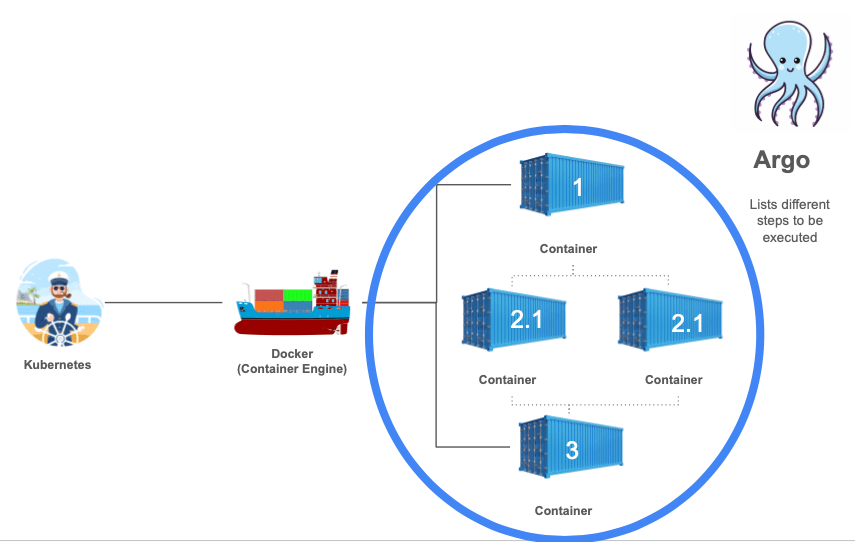
To define the list of steps, we use workflow templates which are definitions of workflows that are persistent on the cluster and can be called by running workflows or submitted on their own.
Argo is built for Kubernetes. It doesn’t just “run on” Kubernetes. It uses Kubernetes’ architecture to define, schedule, run, and manage complex workflows using containers.
The Analogy: Running a Data Application is Like Running a Port
- Docker containers are like shipping containers: standardized, portable, and self-contained.
- Kubernetes is like the Port Authority: orchestrating the arrival, placement, and routing of containers.
- Argo Workflows are like the shipping manifest: specifying the sequence of operations to be performed, and ensuring that the containers reach their destination in the correct order.
Just like a modern port requires tight coordination between ships, cranes, trucks, and storage units, a modern data application requires precise orchestration of containers, storage, and compute resources. Each tool plays a crucial role in ensuring everything runs efficiently, securely, and reliably.
Final Thoughts
Living in Oakland, the Port has become more than just a backdrop, it’s a symbol of organization, logistics, and the power of containers to move the world. Similarly, in my work as a data engineer, I see Docker, Kubernetes, and Argo not just as tools, but as the infrastructure that powers the efficient movement of data.
In both worlds, whether it’s goods moving through a harbor or data flowing through pipelines, the principle is the same: with the right tools and coordination, complex systems can run smoothly.

 Daniela Fernandez